
Wine-Assembly
Classic Windows 98 programs in a browser tab
At a glance
Wine-Assembly is a browser-based Windows 98 emulator that runs original .exe programs and games.
- Pricing
- Open source
- Platforms
- Web
- Category
- Developer Tools
- Website
- berrry.app
- Last checked
What it does
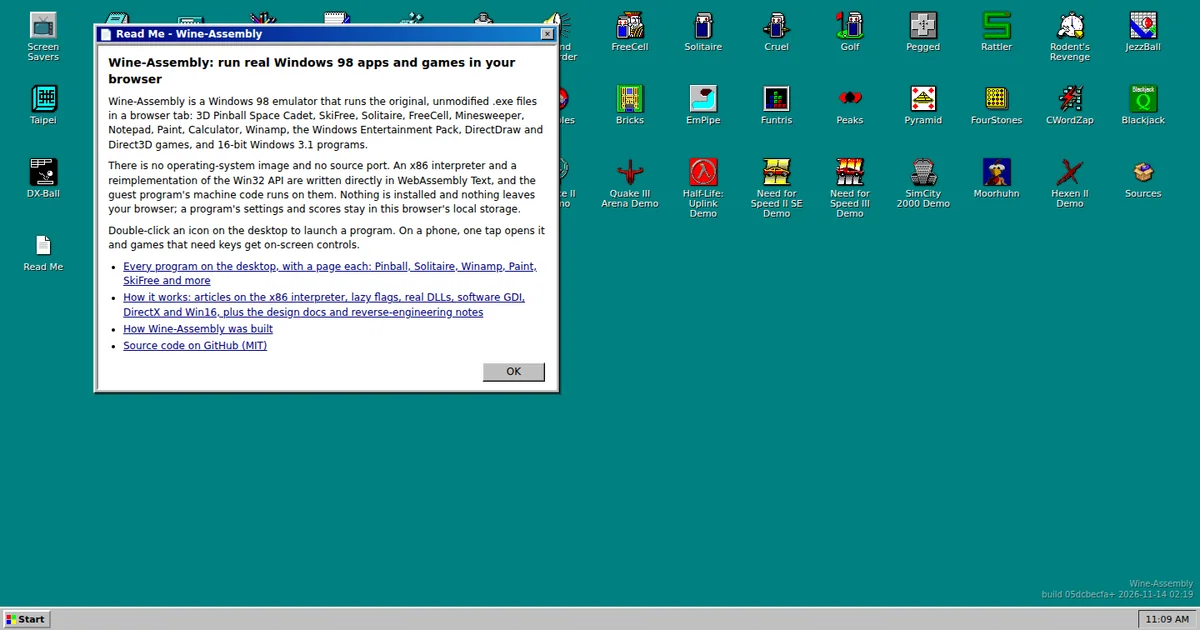
Wine-Assembly is a Windows 98 emulator that runs in the browser. It loads the original, unmodified .exe files, so there is no operating system image to boot. Pinball, Solitaire, Minesweeper, Notepad, Paint, and Winamp all launch in a browser tab.
The emulator loads each program file directly and provides its own Win32 API layer, so the program's machine code runs without a Windows install. The project includes 16-bit Windows 3.1 programs as well as DirectX games and samples.
How it works
- Open the live demo in a browser with WebAssembly support.
- Pick an app from the dropdown and click Launch, or double-click a desktop icon.
- On an iPhone or iPad, add the page to the home screen to run it as a standalone web app.
- Use your own copy of any game that is not part of the included set.
What makes it different
The Win32 API layer is written by hand in WebAssembly Text. The project's documentation covers the x86 decoder, the lazy flag handling, and the software graphics layer, which makes it useful to read if you want to see how an emulator works.
Good to know
- Not every program runs, so check the compatibility list before you rely on a title.
- The emulator needs a browser with WebAssembly support.
- It is a single-purpose emulator for Windows 98 and Windows 3.1 software, not a full PC.
Who it's for
Retro computing fans and developers who are curious about emulation
Typical uses
- Play classic Windows games without an old PC
- Study how an x86 emulator and the Win32 API fit together
- Open a Windows 98 program from a phone browser
Features
- Runs unmodified Windows 98 .exe files in a browser tab
- Launches Notepad, Paint, Solitaire, and Minesweeper
- Runs 16-bit Windows 3.1 programs
- Supports DirectX games and samples
- Works on desktop browsers and on iPhone or iPad
Pricing
Open source
Wine-Assembly is free to use. The code is available under the MIT license.
Limitations
- Not every program runs, so check the compatibility list first
- Needs a browser with WebAssembly support
- Games beyond the included set need your own copies
FAQ
Is Wine-Assembly free to use?
Yes. The live demo is free, and the code is available under the MIT license.
Do I need to install anything?
The browser version runs from the web page, so no install is needed. It needs a browser with WebAssembly support.
Are games included?
The emulator includes several games and demos. For other titles you need your own copy, and not every program runs.