

WA Chat Export & Backup
Offline archives of your WhatsApp conversations
At a glance
WA Chat Export & Backup is a Chrome extension that saves WhatsApp Web chats as TXT, JSON, CSV or HTML files.
- Free3 exports a day
- 74.99 USDAll tools, one-time
- Adds a completeness report to every export, with counts of missing items
- Each export includes an offline HTML page that loads nothing from the internet
- Searches all saved exports by word, sender and date
Works with WhatsApp WebChromeFirefox
- Pricing
- Freemium
- Platforms
- Web
- Category
- Productivity Tools
- Website
- whatsappexport.com
- Last checked
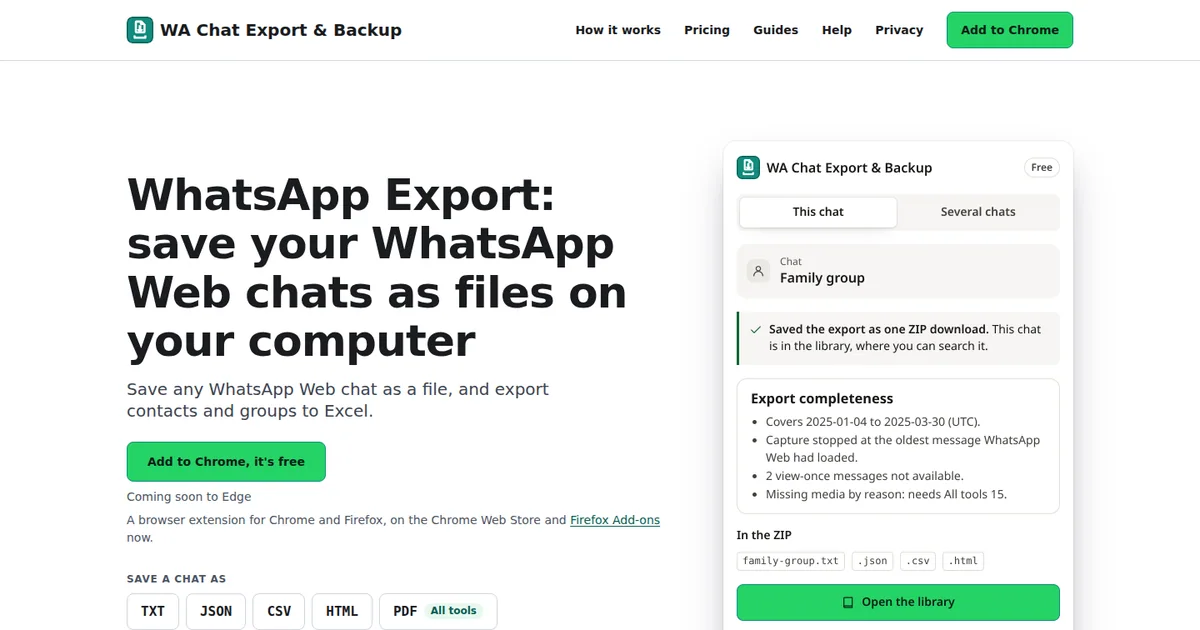
What it does
WA Chat Export & Backup is a Chrome extension for people who want a copy of their WhatsApp Web conversations on their own computer. Open a chat in WhatsApp Web, click the extension, and save the chat as TXT, JSON, CSV or an offline HTML page.
Each export comes with a completeness report. It lists the dates covered and the number of messages and media that were not available, such as view-once and disappearing messages. The HTML page opens in any browser and loads nothing from the internet. The library keeps each export as its own entry, so two exports of the same chat stay apart. Search works offline, and opening a result shows the message in its chat.
How it works
- Open the chat in WhatsApp Web.
- Click the extension, choose Export this chat, and press start.
- Find the files on your computer, or search them in the built-in library.
Good to know
Every export starts with your click. The extension never sends messages and never types into WhatsApp Web. WhatsApp Web may not load the oldest messages of a chat, and the export says where it stopped. The free plan allows three exports a day, without media files. If the license server cannot be reached, All tools stays on for a short grace period, and the key is checked again once the last answer is more than a day old.
Who it's for
People who want their WhatsApp Web chats saved as files on their own computer
Typical uses
- Keep a copy of a family group chat on your own computer
- Save a client's conversation as a PDF for your records
Features
- Exports a WhatsApp Web chat to TXT, JSON, CSV and HTML
- Saves photos and files, and exports to PDF, on All tools
- Exports contacts and group members to Excel on All tools
- Searches saved exports by word, sender and date
- Locks an export with a passphrase on All tools
- Refreshes a chat to add only new messages, on All tools
Pricing
Freemium
The free plan exports three chats a day in four formats. All tools costs 8.99 USD a month, 49.99 USD a year or 74.99 USD once, and removes the daily limit.
Limitations
- Works in Chrome and Firefox, and the Edge version is coming soon
- The free plan allows three exports a day and no media files
- WhatsApp Web may not load the oldest messages of a chat
FAQ
Is WA Chat Export & Backup free?
Yes, the free plan exports any chat to TXT, JSON, CSV and HTML, three times a day. All tools costs 8.99 USD a month, 49.99 USD a year or 74.99 USD once.
Does it export to Excel?
Yes. The CSV file has one row per message and opens in Excel. Contacts can be exported to an Excel file on the All tools plan.
Does the extension send my chats to a server?
No. Exports are saved on your computer. Activating a license sends only the license key to the license server.
Can I get a refund?
Yes, for the first payment within 7 days of purchase, if the license key has never been used. Renewals are not refunded.