

TrimrPix for iPhone
Shrinks iPhone photos in place, without duplicates
At a glance
TrimrPix is a $1.99 iPhone app that compresses your photos and replaces each original with the smaller version. It works without internet and keeps JPEG, PNG and HEIC formats.
- $1.99pay once, App Store
- 3 formatsJPEG, PNG and HEIC
- Replaces originals in place, so no duplicate album is left behind
- Keeps each photo in its original format, so a HEIC stays HEIC
- Built by one developer to do one job well
Works with iCloud Photos
- Pricing
- Paid
- Platforms
- iOS
- Category
- Design Tools
- Website
- iamjarl.com
- Last checked
What it does
TrimrPix is an iPhone app that makes the photos in your library smaller. It compresses each photo and puts the smaller version back where the original was, so there are no duplicates to clean up afterwards.
How it works
- Select the photos you want to shrink.
- Configure the quality level or a target size.
- Confirm the change with a slide, after a summary of what will happen.
- Done: the originals are replaced by the compressed versions.
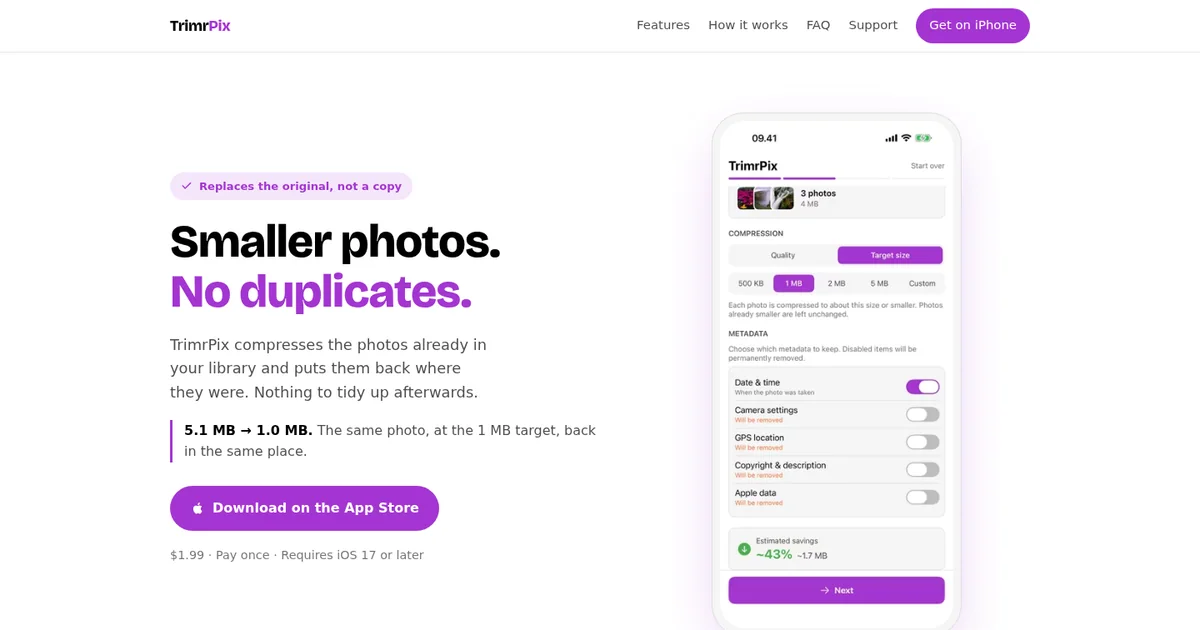
Three quality levels, Same, Good and Smaller, set how far each photo shrinks. Target size mode finds the highest quality that keeps each photo under a size you pick, such as 500 KB or 2 MB. Photos already smaller than the target stay unchanged. JPEG, PNG and HEIC photos keep their original format, so a HEIC stays HEIC.
Offline and iCloud
Compression runs on the iPhone, so it works without an internet connection. Photos stored in iCloud are downloaded, compressed and saved back automatically. The app also sends anonymous crash reports.
If you change your mind
The original stays available in Photos. You can use Revert to Original on a photo, or find the original in Recently Deleted, where it stays for 30 days.
Who it's for
iPhone users whose photo library takes up too much storage
Typical uses
- Free up iPhone storage without deleting photos
- Shrink photos under the file size that an email or online form requires
Features
- Compresses photos on the iPhone and replaces the originals in place
- Offers three quality levels, from nearly lossless to maximum savings
- Targets a file size, such as 500 KB, 1 MB, 2 MB or 5 MB
- Keeps JPEG, PNG and HEIC photos in their original format
- Controls which metadata is kept or removed
- Compresses photos stored in iCloud
Pricing
Paid
A one-time purchase of $1.99 on the App Store. It requires iOS 17 or later.
Limitations
- Available for iOS only, and it requires iOS 17 or later.
- Photos stored in iCloud are downloaded to the device before they can be compressed.
- Only JPEG, PNG and HEIC photos can be compressed.
FAQ
Is TrimrPix a one-time purchase?
Yes. It costs $1.99 once, paid through the App Store.
Does TrimrPix work without internet?
Yes. Compression runs on the iPhone. The app downloads an iCloud photo only when you compress that photo.
What happens to my original photos?
Each original is replaced by the smaller version. You can use Revert to Original in Photos, or find the original in Recently Deleted for 30 days.
Can I compress photos to a specific file size?
Yes. Target size mode lets you pick 500 KB, 1 MB, 2 MB or 5 MB, or enter your own size. Photos already smaller stay unchanged.