

Speaklit
AI help for anything on your screen
At a glance
Speaklit is a small AI bar for Windows, Mac and Linux that explains text on your screen and reads it out loud.
- 20free uses a day
- $5per student a year
- Reads and explains text in any app, website or PDF
- Floats above your work, so you stay in the same window
- Layouts run from a full reading bar to a single button
- Pricing
- Freemium
- Platforms
- Windows, macOS, Linux, Browser extension
- Category
- AI Productivity Tools
- Website
- speaklit.ai
- Last checked
What it does
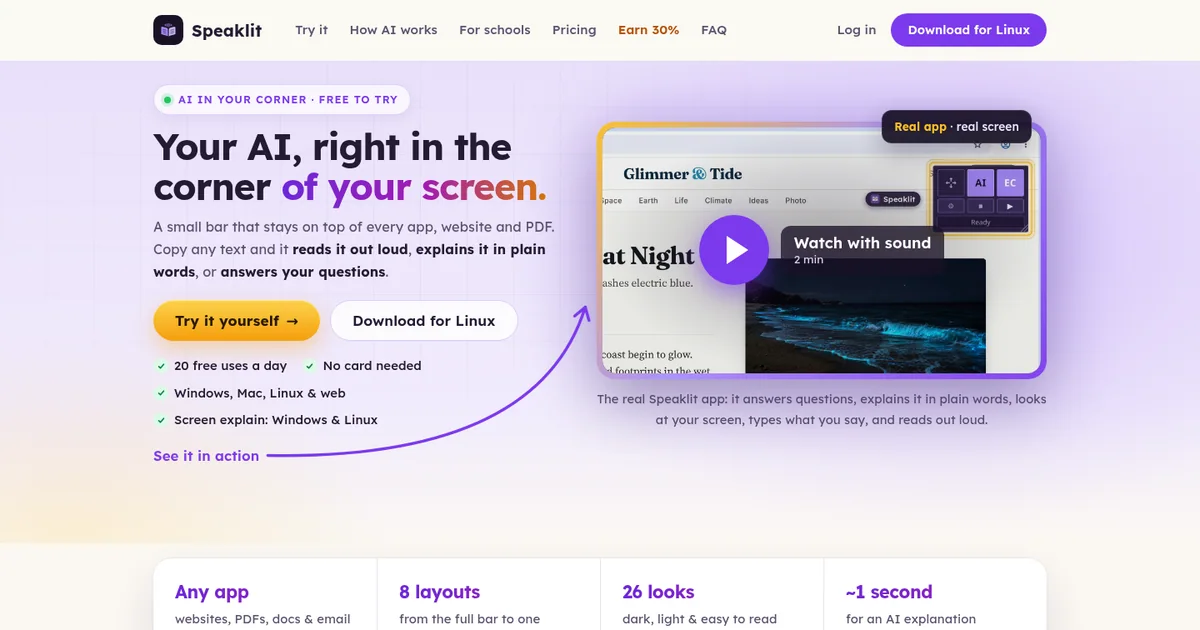
Speaklit is a floating bar that stays on top of your apps, websites and PDFs. Press Ctrl + Alt + W and it explains a bill, a form or an error message on your screen in plain words. It can also read text out loud.
The bar is one small window in the corner of the screen, and you choose how much of it you see.
How it works
- Copy any text, or press Ctrl + Alt + W on the screen.
- Ask a question, or pick explain or read aloud.
- Read the answer in the bar, while you keep working in the same window.
Layouts and looks
The bar has eight layouts, from a full reading toolbar to a single AI button. It also comes in 26 looks, including dark, light and easy-to-read styles.
Free use and schools
Every account gets 20 free uses a day, including up to 5 AI answers. The uses come back at midnight. Schools can buy access for each student at $5 a year.
Good to know
- Screen explain works on Windows and Linux.
- Chrome and Chromebook users add the extension from the Chrome Web Store.
Who it's for
Students and anyone who reads a lot on screen
Typical uses
- Understand a utility bill or a form line by line
- Have a long PDF or web article read aloud while you work
- Decode an error message on your screen
Features
- Explains text on your screen in plain words
- Reads text out loud from any app, website or PDF
- Answers your questions about the text on your screen
- Eight layouts, from a full toolbar to one AI button
- Screen explain shortcut on Windows and Linux
- Chrome extension for Chrome and Chromebooks
Pricing
Freemium
The free plan includes 20 uses a day, with up to 5 AI answers. Schools can buy access for each student at $5 a year.
Limitations
- Screen explain works on Windows and Linux only.
- The free plan allows 20 uses a day, including up to 5 AI answers.
FAQ
Is Speaklit free?
Yes. Every account gets 20 free uses a day, including up to 5 AI answers, and no card is needed.
Which systems does Speaklit run on?
Windows, Mac and Linux as an app, and in Chrome and on Chromebooks through the Chrome Web Store.
Can a school buy Speaklit for students?
Yes. Schools can buy access for each student at $5 a year.