
Lampka
Reads long PDFs and picks up where you stopped
At a glance
Lampka is a Windows PDF reader for long theses, papers and reports, with optional Pro study tools.
- FreeReading, always free
- Pay oncePro, after the beta
- Windows10 and 11, in beta
- Highlights and notes are kept by Lampka, and the PDF is never changed
- Dark pages keep photos and diagrams in their original colours
- Works offline, with no account and no reading data sent anywhere
Works with OneDriveDropbox
- Pricing
- Freemium
- Platforms
- Windows
- Category
- Productivity Tools
- Website
- lampka.app
- Last checked
What it does
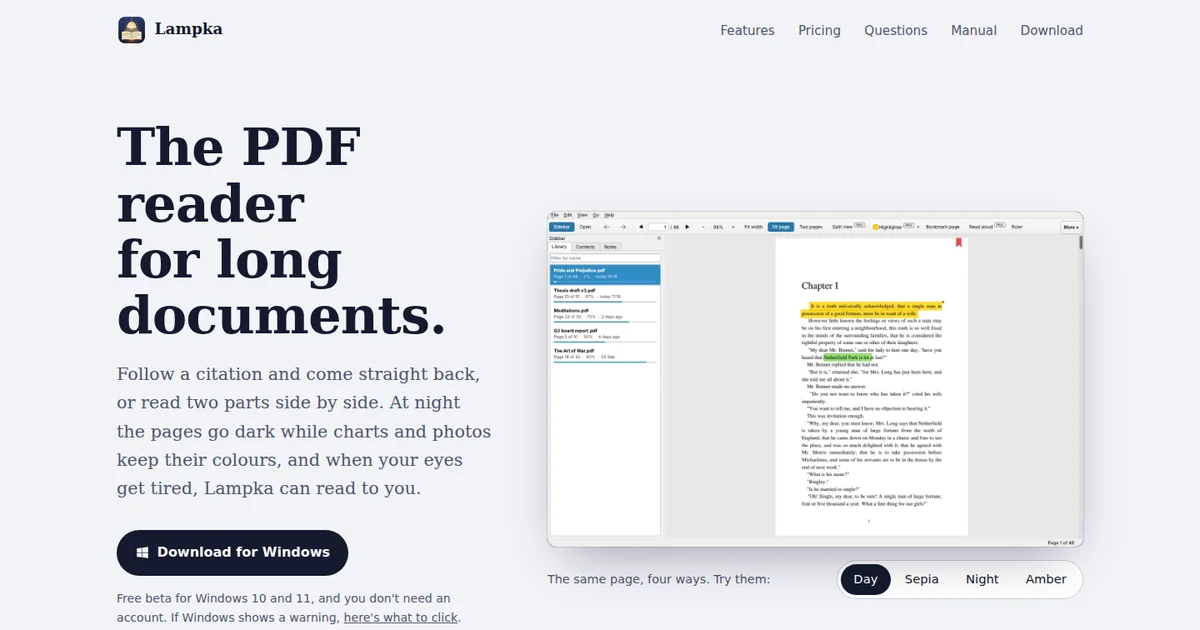
Lampka is a PDF reader for Windows, built for long documents such as theses, papers and reports. It opens each file where you stopped last time and keeps your documents in a library, so a long read does not start over every day.
Reading is free, and that includes themes, links, bookmarks, find and printed page numbers. The study tools are in Pro, a one-time purchase. During the beta, Pro is free too, and every new install gets 14 days of Pro to try.
How it works
- Download the beta for Windows 10 or 11 from the Lampka website and run the setup file.
- Open a PDF, and Lampka keeps your place in it.
- Highlight passages in Pro, or let a night theme start by itself in the evening.
What makes it different
Lampka leaves the PDF file itself untouched. Highlights, notes and bookmarks are kept in Lampka's own folder on your computer, so the file looks the same in any other app. Dark pages keep photos and diagrams in their colours while the text changes, which helps with illustrated manuals and charts.
Good to know
- Students and people who use a disability support service can ask for 40% off Pro.
- Your highlights and notes stay on your computer, even after the beta ends.
Who it's for
Students and researchers who read long PDFs on Windows
Typical uses
- Reading a long thesis or report with links and bookmarks
- Studying a dense paper at night with a dark theme
- Reading a PDF bundle on a Windows laptop and picking up where you left off
Features
- Remembers your place in every document in a library
- Night themes that switch on at an evening time you set
- Links with Back, contents, bookmarks and find
- Printed page numbers, reading ruler and two-page view
- Highlights in five colours, notes and Markdown export (Pro)
- Read aloud, also offline (Pro)
Pricing
Freemium
Reading is free. Lampka Pro is a one-time purchase. Every new install gets 14 days of Pro to try.
Limitations
- The beta runs on Windows 10 and 11 only, and a Mac version is planned
- Lampka cannot edit or sign PDFs
- Each beta build works for 90 days, then a newer build is needed
FAQ
Is Lampka free?
Reading is free. During the beta, the Pro tools are free too. After the beta, Pro is a one-time purchase, not a subscription.
Does Lampka run on a Mac?
Not yet. The beta is for Windows 10 and 11, and a Mac version is planned.
Does Lampka change my PDF files?
No. Highlights, notes and bookmarks are stored by Lampka on your computer, and the original files are not modified.
Does Lampka send my reading data anywhere?
No. The app works offline without an account. It checks for a new version once a day, and that check sends nothing about you.