
iMacroPad
Turn your iPad into a Mac macro pad
At a glance
iMacroPad turns an iPad or iPhone into an app-aware macro pad for the Mac, with keys, knobs, faders, a trackpad and a Pencil area.
- Platforms
- iOS, macOS
- Category
- Productivity Tools
- Website
- imacropad.app
- Last checked
What it does
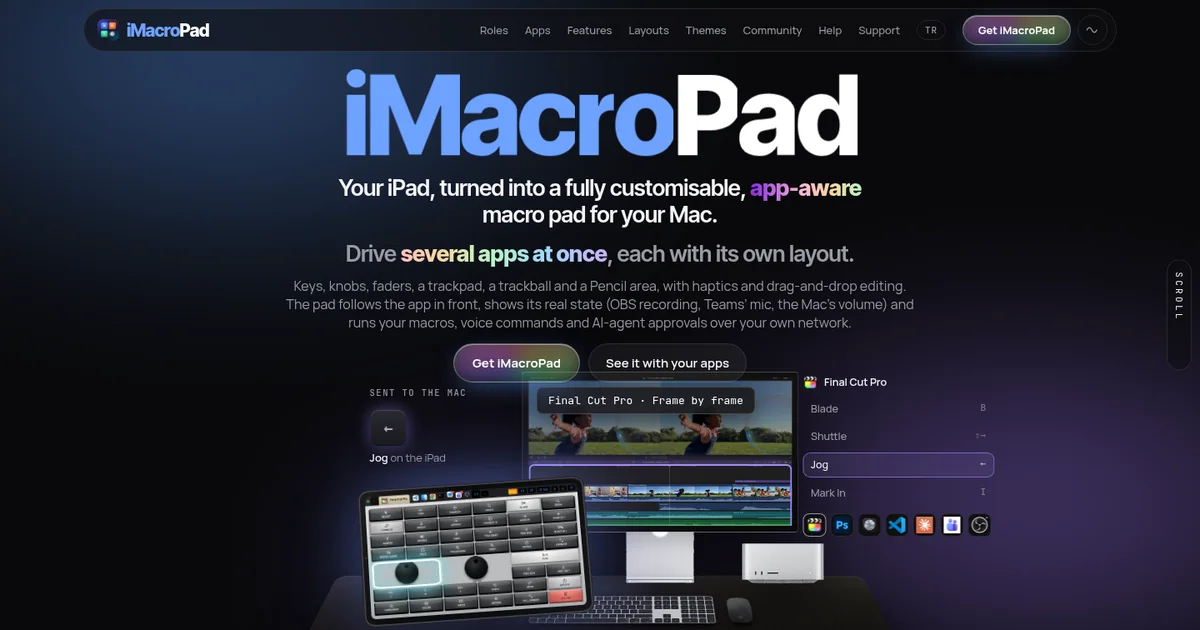
iMacroPad turns your iPad or iPhone into a macro pad for your Mac. The pad shows keys, knobs, faders, a trackpad, a trackball and a Pencil area, and it changes its layout when you switch to another app on the Mac.
Many Mac workflows depend on shortcuts that are hard to remember or spread across menus. A hardware deck costs money and takes desk space, while the iPad you already own can hold the same controls and be rearranged in a few taps.
How it works
- Install the app on your iPad or iPhone and connect it to your Mac over your own network.
- Bring an app to the front on the Mac, and the pad switches to that app's layout.
- Edit the keys by drag and drop, then add macros, voice commands or AI-agent approvals.
What makes it different
The pad reads the live state of some apps, such as OBS recording or the microphone status in Microsoft Teams, and shows it on the matching key. Each app gets its own layout, theme and keys.
Good to know
- There is no hardware to buy, and no cables are needed.
- Native integrations are listed for several apps, including Final Cut Pro.
Who it's for
Mac users who edit video, stream or rely on many app shortcuts
Typical uses
- Start and stop an OBS recording from the iPad during a live stream
- Approve AI-agent actions from the iPad while you work on the Mac
- Edit video in Final Cut Pro with a custom iPad layout
Features
- Switches its layout when you change apps on the Mac
- Adds keys, knobs, faders, a trackpad and a trackball
- Shows live state, such as OBS recording or Teams microphone status
- Runs macros and voice commands over your own network
- Supports drag-and-drop editing of the layout
Pricing
See the product's website for current plans and pricing.
Limitations
- The pad runs over your own network, so the iPad and the Mac need a connection between them
- Native layouts exist only for the apps that iMacroPad supports
FAQ
Do I need a hardware macro pad?
No. The iPad or iPhone you already own becomes the pad, so there is no box to buy.
Does the pad change with the app in front?
Yes. When you bring an app to the front on the Mac, the pad changes with it.
Which apps show live state?
The pad shows live state for apps such as OBS, Photoshop and Microsoft Teams.