

GenderSwapApp
Upload a selfie and see a male or female version of it
At a glance
GenderSwapApp is a browser tool that turns a portrait into a male or female version with AI. Upload one selfie, pick a direction and download the result as a PNG.
- 2free images, no sign-up
- 1.99USD for 12 credits
- Two free images without an account
- Credits never expire and nothing renews
- Both directions in one browser tool
- Pricing
- Freemium
- Platforms
- Web
- Category
- AI Image & Video Tools
- Website
- genderswapapp.com
- Last checked
What it does
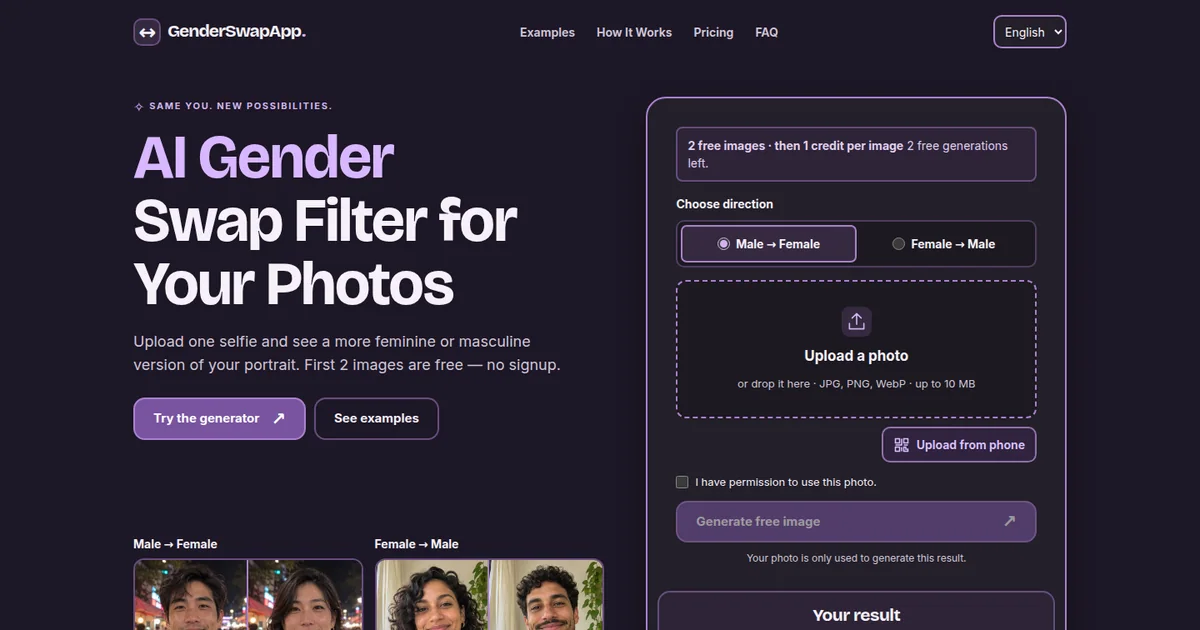
GenderSwapApp is a browser tool that makes a new version of a portrait with AI. You upload one photo, choose Male to Female or Female to Male, and get back a PNG where the face and styling are changed while the expression and background stay close to the original.
How it works
- Upload a JPG, PNG or WebP photo up to 10 MB from your phone or computer.
- Pick the direction you want to see.
- Confirm that you have permission to edit the photo, then generate the image.
- Compare the result with your original and download the PNG you like.
What you get
Each finished image is a 1024 × 1280 PNG without a watermark. The first two images are free without signing in. Paid credit packs work on a one-image-per-credit basis, and the credits never expire. The tool uses the portrait as a reference, so a front-facing selfie with the hairline and chin in frame gives the most useful result.
Good to know
- The browser resizes the photo before upload, which removes embedded metadata.
- The resized photo goes to an image provider for editing, and the app discards it when the request ends.
- The uploader does not accept HEIC files, so save a JPEG copy of the selfie first.
- Results depend on the photo, so good lighting and a clear face help the result.
Who it's for
People who want to try a different look on a portrait
Typical uses
- See a different look before a haircut or styling change
- Compare a gender-swapped edit with your original selfie
- Make a playful portrait for a profile picture
Features
- Male to female and female to male directions
- PNG download at 1024 × 1280 with no watermark
- Two free images without signing in
- Credit packs that never expire and do not renew
- Works in phone and desktop browsers with no app to install
- Keeps the expression and background close to the original
Pricing
Freemium
Two images are free with no sign-up. After that, one-time credit packs cost 1.99 USD for 12 credits, 7.90 USD for 55 credits and 12.90 USD for 180 credits, with no subscription.
Limitations
- Uploads must be JPG, PNG or WebP files up to 10 MB, so HEIC photos need a JPEG copy first.
- Each completed image uses one credit, whichever direction you choose.
- Results depend on the photo, so a well-lit front-facing selfie gives the most useful result.
FAQ
Is GenderSwapApp free?
Yes, with a limit. You get two free images without signing in, and neither uses a credit. After that, a credit pack starts at 1.99 USD for 12 credits, and each completed image uses one credit.
Do I need to install an app?
No. Open GenderSwapApp in a mobile or desktop browser, select a photo from your device and download the PNG when the edit is ready.
What happens to my photo?
The browser resizes the photo and removes its metadata before upload. The resized photo goes to an image provider for editing, and the app discards it when the request ends.