

ClearBar
Tidy menu bar icons, keep every app reachable
At a glance
ClearBar is a menu bar manager for Mac that hides third-party icons and keeps every app in one panel.
- 7 USDone-time price
- 14 daysrefund window
- 1Mac per license
- Keeps every menu bar app in one panel, one click away
- Shows memory use per app and quits it from the same panel
- Asks only for Accessibility permission, never Screen Recording
Works with Docker
- Pricing
- Paid
- Platforms
- macOS
- Category
- Productivity Tools
- Website
- clearbarmac.app
- Last checked
What it does
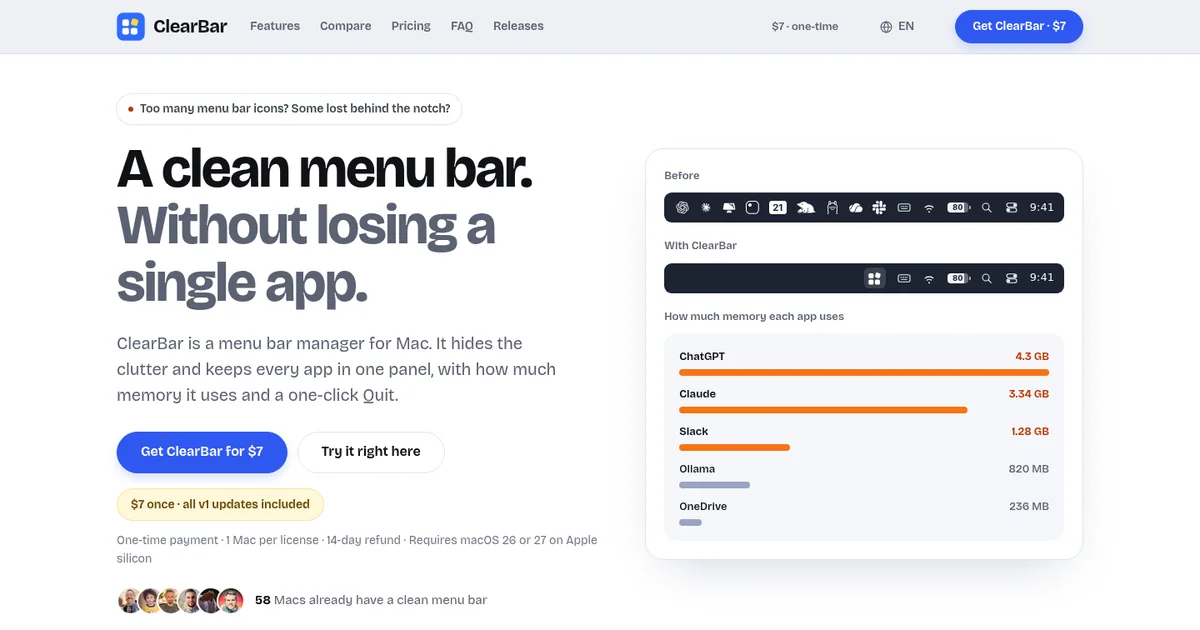
ClearBar is a menu bar manager for Mac. It hides third-party menu bar icons and keeps every hidden app one click away in a single panel. Apple's own items, such as Wi-Fi, the battery and the clock, stay visible.
From the same panel you can see how much memory each app uses, and quit an app or force quit it in one click. Docker containers show their memory use and can be stopped there too.
How it works
- Choose the icons to hide. Hidden apps keep running, and you reach them from the panel.
- Open the panel to switch to an app, check its memory or quit it.
- Right-click the ClearBar icon and choose Show All Icons in Menu Bar when you need a hidden icon again.
ClearBar asks only for Accessibility permission. It never asks for Screen Recording, and the app is signed with an Apple Developer ID and notarized by Apple.
Good to know
ClearBar needs an Apple silicon Mac running macOS 26 or 27, and Intel Macs are not supported. Icon hiding uses a private macOS API, so an update may be needed when Apple changes it. Each license covers one Mac.
Who it's for
Mac users with many menu bar apps and a crowded menu bar
Typical uses
- Clear a crowded menu bar on a laptop
- Find out which app uses the most memory, and quit it
- Stop a Docker container from the menu bar
Features
- Hides third-party menu bar icons
- Shows every menu bar app in one panel
- Displays memory use for each app
- Quits or force quits an app in one click
- Shows Docker containers with their memory use and a Stop option
- Keeps Apple's own menu bar items visible
Pricing
Paid
ClearBar costs 7 USD once, with all v1 updates included, and comes with a 14-day refund window. One license covers one Mac, and all prices include tax.
Limitations
- Supports only Macs with Apple silicon running macOS 26 or 27
- Icon hiding depends on a private macOS API that may need an update
- One license covers one Mac
FAQ
Does ClearBar work on Intel Macs?
No. ClearBar supports only Macs with Apple silicon running macOS 26 or 27.
Does an app stop when I hide its icon?
No. The app keeps running and using memory, but you can no longer click its icon in the menu bar.
Does ClearBar need Screen Recording permission?
No. It asks only for Accessibility permission, and the app is signed and notarized by Apple.
How much does ClearBar cost?
ClearBar costs 7 USD once, with all v1 updates included. One license covers one Mac.