

BoostMails
Reply from the right brand, approved by you
At a glance
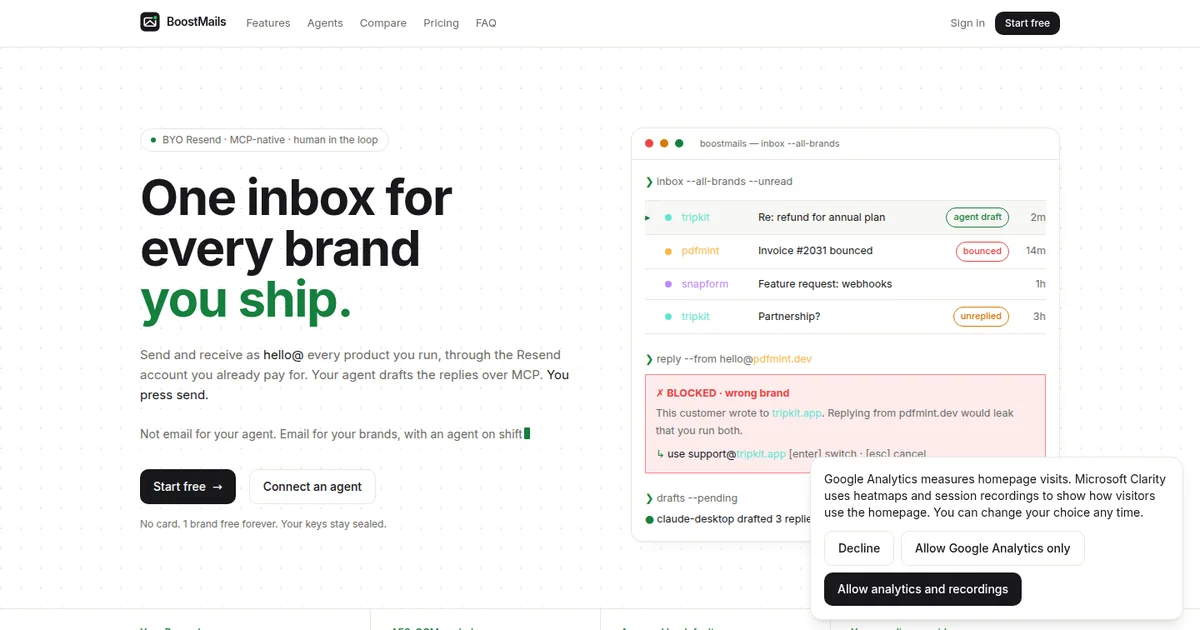
BoostMails is a shared inbox for founders who run several products, and it sends each reply from the matching domain through your own Resend account.
- 0 USDFree plan, one brand
- 19 USD/moPro plan
- Wrong-brand guard blocks replies from a domain that does not match the thread
- Approval by default, so an agent cannot send on its own
- Your Resend bill covers the sending, with no markup on the sends
Works with ResendCloudflare Email SendingClaudeCodexGrok
- Pricing
- Freemium
- Platforms
- Web, API
- Category
- Customer Support Tools
- Website
- boostmails.com
- Last checked
What it does
BoostMails is a shared inbox for founders who run several products. Each product gets its own colour, addresses and signature, and all mail for every product shows up in one list. Replies go out through your own Resend or Cloudflare Email Sending account, so the sending costs stay on your bill.
How it works
- Paste a Resend API key, and BoostMails lists your verified domains.
- Turn each domain into a brand with its own addresses and signature.
- Point Resend Receiving or a mail forward at BoostMails, and new mail lands in the inbox.
- Connect an AI agent over MCP if you want one, and review its drafts before anything is sent.
What makes it different
The wrong-brand guard stops a reply that would leave from a domain that does not match the thread. If a customer has written to another of your products, BoostMails warns you before you answer, so you do not reveal that the products share an owner.
Good to know
- Agents can read the brands you allow and write drafts by default. Letting an agent send needs a workspace owner or admin to switch it on.
- The Free plan covers one brand and 200 sends a month, and Pro adds more brands and agent drafts.
Who it's for
Founders and indie makers who run several products on one email setup
Typical uses
- Answer support mail for three small products from one inbox
- Let an agent draft replies to customer questions for you to approve
- Warn yourself before a reply goes out from the wrong product address
Features
- Shows mail for all your products in one inbox
- Blocks replies sent from the wrong brand domain
- Lets an AI agent draft replies over MCP
- Sends through your own Resend or Cloudflare Email Sending account
- Requires your approval before a draft is sent by default
- Seals provider API keys with AES-GCM encryption
Pricing
Freemium
The Free plan costs 0 USD for one brand, one sending account, 200 sends and 20 agent drafts a month. Pro costs 19 USD a month, and Team costs 49 USD a month with 10 seats.
Limitations
- Sending needs your own Resend or Cloudflare Email Sending account
- Agents cannot send email until a workspace owner or admin enables it
- The Free plan is limited to one brand and 200 sends a month
FAQ
Is BoostMails free?
Yes. The Free plan costs 0 USD and covers one brand, one sending account and 200 sends a month. Pro costs 19 USD a month.
Do I need my own Resend account?
You can send through your own Resend or Cloudflare Email Sending account. That provider bills you directly for sending.
Can an AI agent send email on its own?
Not by default. The agent prepares drafts, and you approve them before they leave. A workspace owner or admin can enable agent sending.
Which AI tools can connect to BoostMails?
Any client that supports remote MCP, such as Claude, Codex or Grok, and any script that can send an HTTP POST to the REST endpoints.