

AudioBento
Free browser tools for trimming, joining and converting audio
At a glance
AudioBento is a free collection of browser-based audio tools for trimming, joining, converting and enhancing audio without an account.
- Freeno account needed
- 15+audio tools
- Free tools that run in your browser
- No account and no upload needed
- One tool for each common audio job
- Pricing
- Free
- Platforms
- Web
- Category
- Education & Learning Apps
- Website
- audiobento.com
- Last checked
What it does
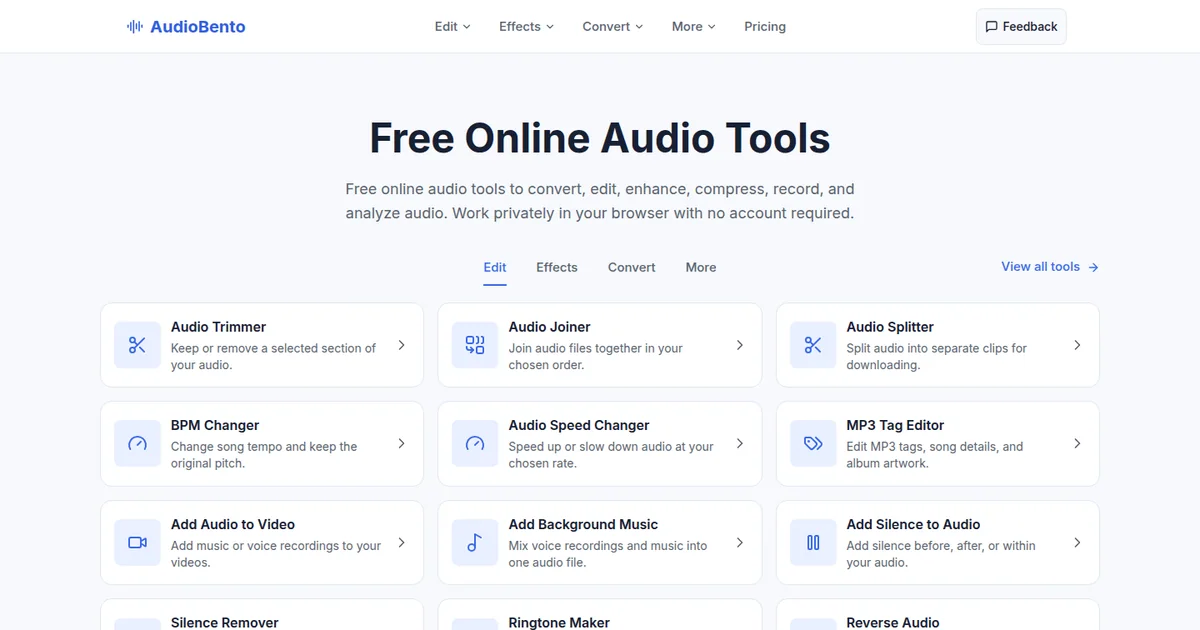
AudioBento is a free collection of audio tools that run in your browser. You can trim a clip, join several files in your chosen order, split a recording into clips, change the tempo or speed of a song, edit MP3 tags and album artwork, or convert between formats.
Each tool covers one job, so you open the one you need and finish the task. Nothing is uploaded to an account, and the site says the work stays private on your own device.
How it works
- Open the tool for your task, such as the Audio Trimmer or the Audio Joiner.
- Load your file. The tool works on the audio in your browser.
- Download the result. No sign-up is needed at any step.
What makes it different
The tools are built for quick jobs, such as cutting a ringtone, removing silence from a voice recording or adding background music to a video. The BPM Changer keeps the original pitch while it changes the tempo, and the Silence Remover can split a recording at its silent gaps.
Good to know
Processing happens on your own device, so large files depend on your computer's speed. The collection covers common audio edits and conversions rather than a full recording studio.
Who it's for
Creators, musicians and anyone who needs a quick audio edit without installing software
Typical uses
- Cut a ringtone from a favourite song
- Remove pauses from a voice memo before sharing it
- Add background music to a short video
Features
- Trim, split and join audio files in a browser
- Change tempo while keeping the original pitch
- Remove silence or split recordings at quiet gaps
- Edit MP3 tags and album artwork
- Add music or voice recordings to a video
- Make custom ringtones from songs or recordings
Pricing
Free
The tools are free to use, and no account is needed.
Limitations
- Processing runs on your own device, so very large files take longer.
- Each tool covers one audio task rather than a full editing workflow.
FAQ
Is AudioBento free?
Yes. The tools are free to use, and no account is needed.
Are my files uploaded?
No. The tools run in your browser, and the site says the work stays on your device.
Can I change the speed without changing the pitch?
Yes. The BPM Changer changes the tempo and keeps the original pitch.